5.1 介紹與環境安裝
假定我們有一個專案需求,希望用Rpc作為內部API的通訊,同時也想對外提供Restful Api,寫兩套又太繁瑣不符合
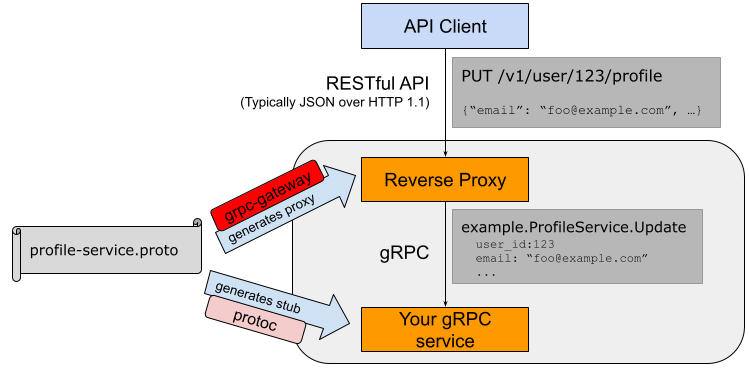
於是我們想到了Grpc以及Grpc Gateway,這就是我們所需要的
準備環節
在正式開始我們的Grpc+Grpc Gateway實踐前,我們需要先設定好我們的開發環境
- Grpc
- Protoc Plugin
- Protocol Buffers
- Grpc-gateway
Grpc
是什麼
Google對Grpc的定義:
A high performance, open-source universal RPC framework
也就是Grpc是一個高效能、開源的通用RPC框架,具有以下特性:
- 強大的
IDL,使用Protocol Buffers作為資料交換的格式,支援v2、v3(推薦v3) - 跨語言、跨平臺,也就是
Grpc支援多種平臺和語言 - 支援HTTP2,雙向傳輸、多路複用、認證等
安裝
1、官方推薦(需科學上網)
go get -u google.golang.org/grpc
2、透過github.com
進入到第一個$GOPATH目錄(因為go get 會預設安裝在第一個下)下,新建google.golang.org目錄,拉取golang在github上的映象庫:
cd /usr/local/go/path/src

mkdir google.golang.org

cd google.golang.org/

git clone https://github.com/grpc/grpc-go

mv grpc-go/ grpc/
目錄結構:
google.golang.org/
└── grpc
    ...
而在grpc下有許多常用的包,例如:
- metadata:定義了
grpc所支援的元資料結構,包中方法可以對MD進行取得和處理 - credentials:實作了
grpc所支援的各種認證憑據,封裝了客戶端對服務端進行身份驗證所需要的所有狀態,並做出各種斷言 - codes:定義了
grpc使用的標準錯誤碼,可通用
Protoc Plugin
是什麼
編譯器外掛
安裝
go get -u github.com/golang/protobuf/protoc-gen-go
將Protoc Plugin的可執行檔案從$GOPATH中移動到$GOBIN下
mv /usr/local/go/path/bin/protoc-gen-go /usr/local/go/bin/
Protocol Buffers v3
是什麼
Protocol buffers are a flexible, efficient, automated mechanism for serializing structured data – think XML, but smaller, faster, and simpler. You define how you want your data to be structured once, then you can use special generated source code to easily write and read your structured data to and from a variety of data streams and using a variety of languages. You can even update your data structure without breaking deployed programs that are compiled against the "old" format.
Protocol Buffers是Google推出的一種資料描述語言,支援多語言、多平臺,它是一種二進位制的格式,總得來說就是更小、更快、更簡單、更靈活,目前分別有v2、v3的版本,我們推薦使用v3
建議可以閱讀下官方文件的介紹,本系列會在使用時簡單介紹所涉及的內容
安裝
wget https://github.com/google/protobuf/releases/download/v3.5.1/protobuf-all-3.5.1.zip
unzip protobuf-all-3.5.1.zip
cd protobuf-3.5.1/
./configure
make
make install
檢查是否安裝成功
protoc --version
如果出現報錯
protoc: error while loading shared libraries: libprotobuf.so.15: cannot open shared object file: No such file or directory
則執行ldconfig後,再次執行即可成功
為什麼要執行ldconfig
我們透過控制檯輸出的資訊可以知道,Protocol Buffers Libraries的預設安裝路徑在/usr/local/lib
Libraries have been installed in:
   /usr/local/lib

If you ever happen to want to link against installed libraries
in a given directory, LIBDIR, you must either use libtool, and
specify the full pathname of the library, or use the `-LLIBDIR'
flag during linking and do at least one of the following:
   - add LIBDIR to the `LD_LIBRARY_PATH' environment variable
     during execution
   - add LIBDIR to the `LD_RUN_PATH' environment variable
     during linking
   - use the `-Wl,-rpath -Wl,LIBDIR' linker flag
   - have your system administrator add LIBDIR to `/etc/ld.so.conf'

See any operating system documentation about shared libraries for
more information, such as the ld(1) and ld.so(8) manual pages.
而我們安裝了一個新的動態連結庫,ldconfig一般在系統啟動時執行,所以現在會找不到這個lib,因此我們要手動執行ldconfig,讓動態連結庫為系統所共享,它是一個動態連結庫管理命令,這就是ldconfig命令的作用
protoc使用
我們按照慣例執行protoc --help(檢視幫助文件),我們抽出幾個常用的命令進行講解
1、-IPATH, --proto_path=PATH:指定import搜尋的目錄,可指定多個,如果不指定則預設當前工作目錄
2、--go_out:生成golang原始檔
引數
若要將額外的引數傳遞給外掛,可使用從輸出目錄中分離出來的逗號分隔的引數列表:
protoc --go_out=plugins=grpc,import_path=mypackage:. *.proto
import_prefix=xxx:將指定字首新增到所有import路徑的開頭import_path=foo/bar:如果檔案沒有宣告go_package,則用作包。如果它包含斜槓,那麼最右邊的斜槓將被忽略。plugins=plugin1+plugin2:指定要載入的子外掛列表(我們所下載的repo中唯一的外掛是grpc)Mfoo/bar.proto=quux/shme:M引數,指定.proto檔案編譯後的包名(foo/bar.proto編譯後為包名為quux/shme)
Grpc支援
如果proto檔案指定了RPC服務,protoc-gen-go可以生成與grpc相相容的程式碼,我們僅需要將plugins=grpc引數傳遞給--go_out,就可以達到這個目的
protoc --go_out=plugins=grpc:. *.proto
Grpc-gateway
是什麼
grpc-gateway is a plugin of protoc. It reads gRPC service definition, and generates a reverse-proxy server which translates a RESTful JSON API into gRPC. This server is generated according to custom options in your gRPC definition.
grpc-gateway是protoc的一個外掛。它讀取gRPC服務定義,並生成一個反向代理伺服器,將RESTful JSON API轉換為gRPC。此伺服器是根據gRPC定義中的自定義選項生成的。
安裝
go get -u github.com/grpc-ecosystem/grpc-gateway/protoc-gen-grpc-gateway
如果出現以下報錯,我們分析錯誤提示可得知是連線超時(大概是被牆了)
package google.golang.org/genproto/googleapis/api/annotations: unrecognized import path "google.golang.org/genproto/googleapis/api/annotations" (https fetch: Get https://google.golang.org/genproto/googleapis/api/annotations?go-get=1: dial tcp 216.239.37.1:443: getsockopt: connection timed out)
有兩種解決方法,
1、科學上網
2、透過github.com
進入到第一個$GOTPATH目錄的google.golang.org目錄下,拉取genproto在github上的go-genproto映象庫:
cd /usr/local/go/path/src/google.golang.org

git clone https://github.com/google/go-genproto.git

mv go-genproto/ genproto/
在安裝完畢後,我們將grpc-gateway的可執行檔案從$GOPATH中移動到$GOBIN
mv /usr/local/go/path/bin/protoc-gen-grpc-gateway /usr/local/go/bin/
到這裡我們這節就基本完成了,建議多反覆看幾遍加深對各個元件的理解!